
Analysis Engine
OpinionDeck’s analysis engine reads every saved Reddit or HN thread and automatically pulls out the pain points, switch triggers, and desired outcomes buried in the discussion. Instead of skimming 500-comment threads, you see a structured list of what people are actually saying. This page explains what gets extracted, how it works, and how to get the most out of it.
What gets extracted
Pain Points
A pain point is a specific problem a user describes in a thread. The AI identifies language patterns that signal frustration, failure, or unmet needs.
Examples:
- “The search is completely broken — I can’t find anything older than a week”
- “Billing is confusing and I keep getting charged for seats I deleted”
- “There’s no keyboard shortcut for the most common action”
Each pain point is extracted as a concise phrase, attributed to the source thread.
Switch Triggers
A switch trigger is the specific event or circumstance that caused a user to start looking for an alternative. These are distinct from pain points — they’re the tipping point, not the underlying problem.
Examples:
- “We hit the 5-user free tier limit and the jump to paid was too expensive”
- “The acquisition by X changed the pricing completely”
- “New hire couldn’t figure out the onboarding — spent 3 days learning the tool”
Switch triggers are some of the most valuable insights in OpinionDeck because they tell you exactly when and why users churn from competitors.
Desired Outcomes
A desired outcome is what the user ultimately wants to achieve — the end state they’re searching for. These differ from pain points (which describe what’s wrong) by focusing on what success looks like.
Examples:
- “Something that works on mobile without the desktop app”
- “A tool my non-technical co-founder can use without training”
- “One place for notes, tasks, and calendar — I’m tired of switching between apps”
Granular analysis
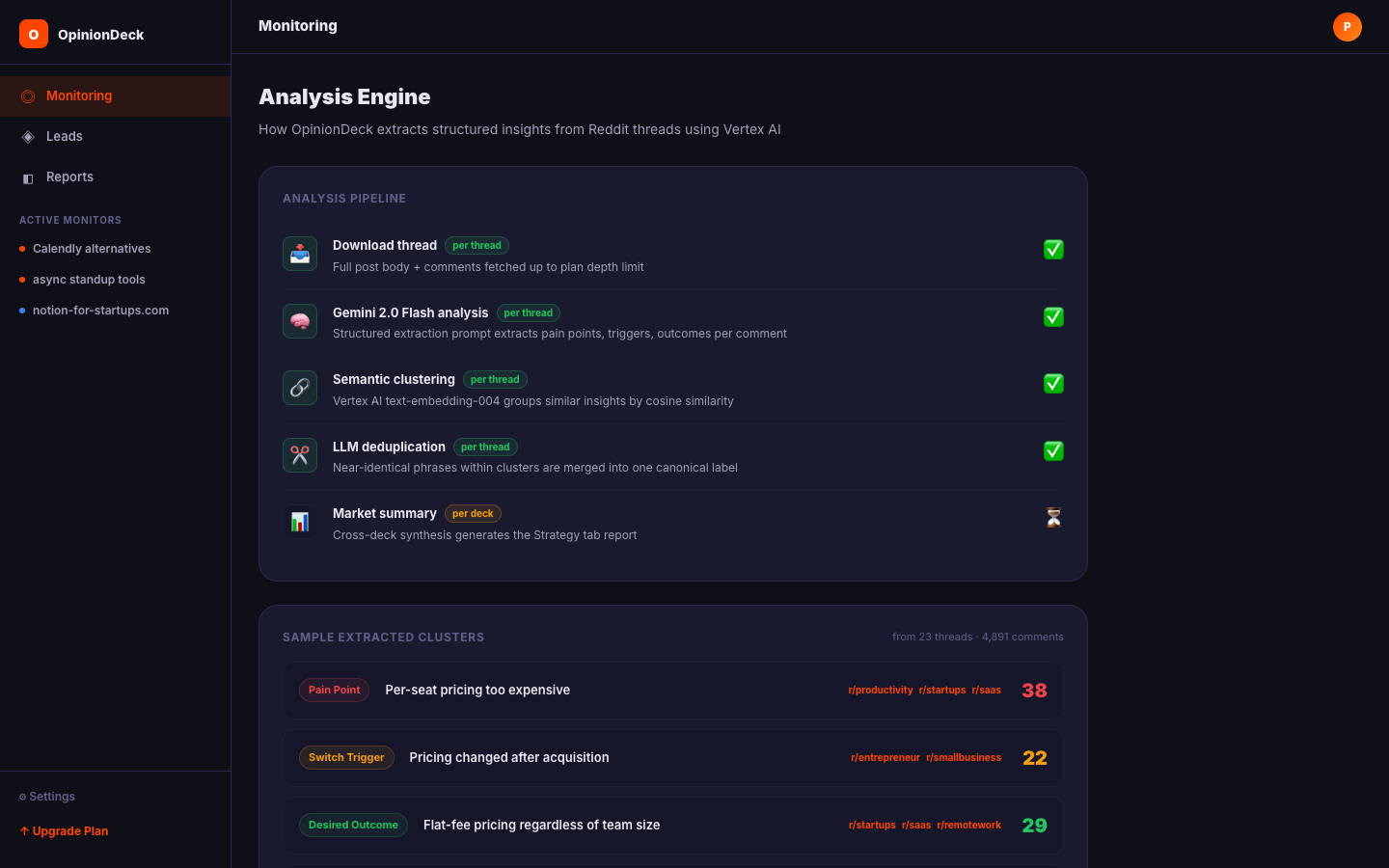
When you save a thread to a Research Deck, OpinionDeck automatically queues a granular analysis job. This job:
- Downloads the full thread (post body + all comments up to your plan’s depth limit)
- Reads every comment and extracts pain points, switch triggers, and desired outcomes — each tagged with how confident the AI is in the extraction
- Stores the results in your Deck’s Pain Map so you can filter, sort, and compare them
The granular analysis runs per-thread in the background. It typically completes within 30–90 seconds — so you can keep working while new threads get processed.
Grouping similar insights into patterns
After individual threads are analysed, OpinionDeck groups similar items together so you see patterns instead of a wall of one-off complaints:
- Pain points about “export” issues get grouped into a single cluster
- Multiple threads mentioning “pricing” as a trigger get combined into one pattern
- Desired outcomes that share a theme (e.g., “offline access”) are merged
The AI compares each pain point against every other and merges the ones that mean the same thing — even when they’re phrased completely differently (e.g., “export doesn’t work” and “can’t download my data” end up in the same cluster). Each cluster is labelled with the clearest phrasing from the group.
The result: instead of 40 individual pain points, you see 8 distinct patterns — each with a count showing how many threads raised that theme. That’s what tells you whether “pricing confusion” is a one-off gripe or your market’s #1 complaint.
Cleaning up near-duplicates
Within a cluster, OpinionDeck does one more pass to catch near-identical items that slipped through — things that say the same thing but weren’t close enough to auto-group. This keeps the Pain Map clean instead of cluttered with slight variations of the same insight.
Market summary (Strategy tab)
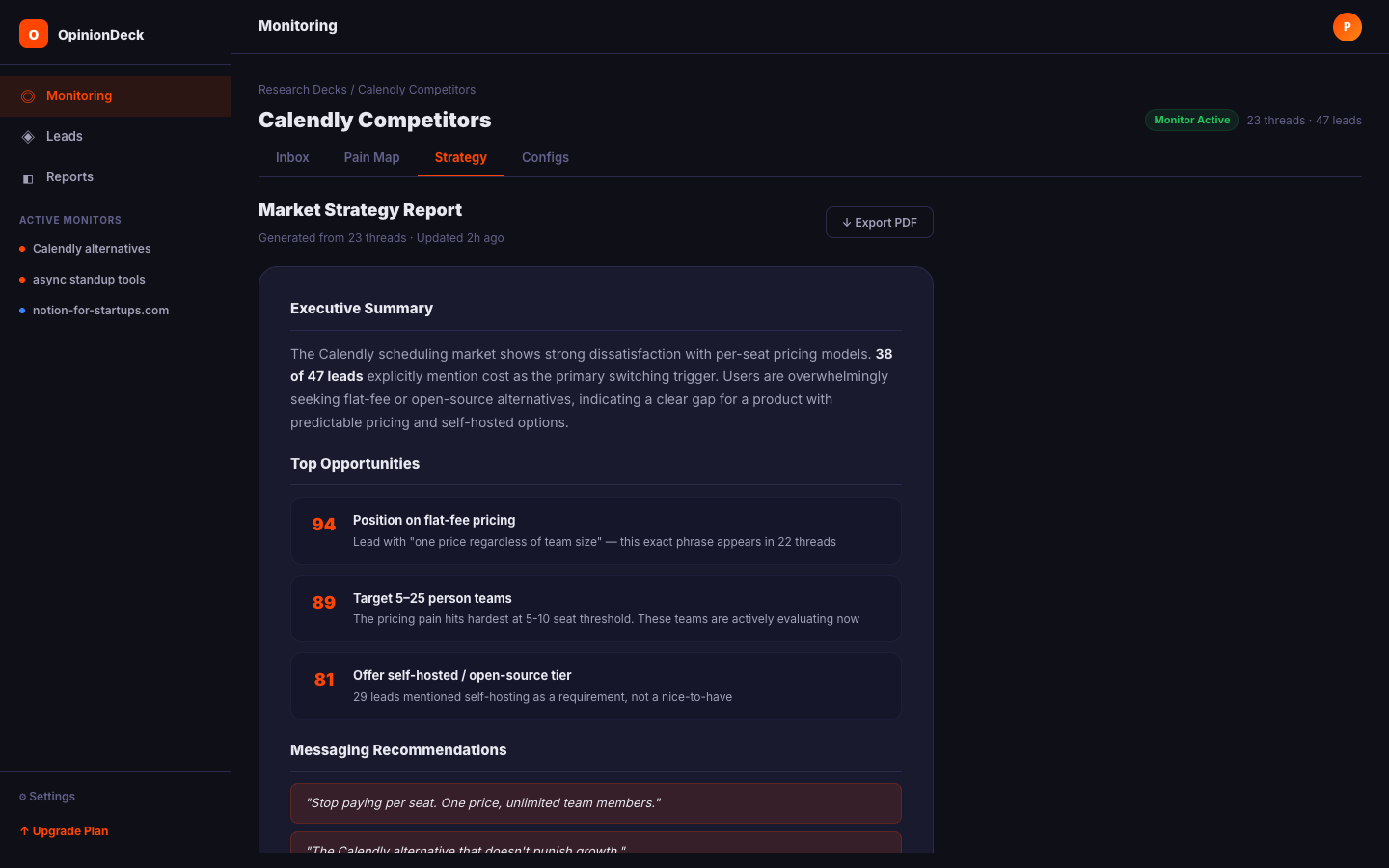
Once a Deck has at least 3 analysed threads, OpinionDeck generates a market summary — a synthesised report written by the AI covering:
- The most common pain points across all threads
- The strongest switch triggers (what’s causing users to look for alternatives)
- Positioning gaps: what competitors are missing
- Tactical recommendations: messaging angles, product priorities, community opportunities
The summary is regenerated automatically when you add new threads or run analysis on additional content.
Analysis limits
| Plan | Monthly analysis reports |
|---|---|
| Free | 1 |
| Trial | 1 |
| Pro | 10 |
| Max | Unlimited |
Each “report” counts as one market summary generation. Granular per-thread extraction doesn’t count against your report limit.
Comment depth and analysis quality
The more comment content OpinionDeck can read, the richer the extracted insights. Comment depth is controlled by your plan:
| Plan | Comments per thread | Comment depth |
|---|---|---|
| Free | 50 | 50 levels |
| Trial | 50 | 50 levels |
| Pro | 5,000 | 500 levels |
| Max | Unlimited | Unlimited |
For threads with rich discussions (100+ comments), upgrading to Pro significantly improves the quality and coverage of extracted insights.
Re-running analysis
If you upgrade your plan and want to re-analyse existing threads with deeper comment extraction, delete and re-save the threads to the Deck — this triggers a fresh download and analysis at your new plan’s comment depth. Automatic re-analysis on plan upgrade is on the roadmap.
Exporting analysis results
From the Strategy tab, you can export:
- PDF report — A formatted document with the market summary, pain points, triggers, and outcomes
- JSON export — Raw structured data for use in spreadsheets or other tools
Export history is retained based on your plan (3 days on Trial, 30 days on Pro, 90 days on Max).